Atoms
Atoms zijn de kleinste bouwstenen van het Tiltshift Design System. Ze vormen de basis voor alle andere componenten en zijn essentieel voor het creëren van een consistente gebruikerservaring.
Logo
Het Tiltshift logo in verschillende groottes. Combineer met utility classes voor positioning.

<div class="a-flex a-gap-4 a-items-center a-p-3 a-bg-off-white a-rounded-md a-flex-wrap">
    <!-- Small Logo (24px) -->
    <img src="https://cdn.tiltshift.nl/assets/logo/logo_cropped.svg"
     alt="Tiltshift"
     class="a-logo a-logo--small" style="height: 24px;">

    <!-- Medium Logo (36px) -->
    <img src="https://cdn.tiltshift.nl/assets/logo/logo_cropped.svg"
     alt="Tiltshift"
     class="a-logo a-logo--medium" style="height: 36px;">

    <!-- Large Logo (48px) -->
    <img src="https://cdn.tiltshift.nl/assets/logo/logo_cropped.svg"
     alt="Tiltshift"
     class="a-logo a-logo--large" style="height: 48px;">

    <!-- Extra Large Logo (140px) -->
    <img src="https://cdn.tiltshift.nl/assets/logo/logo_cropped.svg"
     alt="Tiltshift"
     class="a-logo a-logo--xlarge" style="height: 140px;">
</div>
Heading
Herbruikbare heading atom voor h1-h6 elementen. Parameters voor level, size en styling.
Heading Level 1 - Extra Large
Heading Level 2 - Large
Heading Level 3 - Medium
Heading Level 4 - Small
Custom Size XL op H3
<div class="a-space-y-3">
    <!-- Heading Level 1 -->
    <h1 class="a-heading a-text-2">Heading Level 1 - Extra Large</h1>

    <!-- Heading Level 2 -->
    <h2 class="a-heading a-text-2">Heading Level 2 - Large</h2>

    <!-- Heading Level 3 -->
    <h3 class="a-heading a-text-2">Heading Level 3 - Medium</h3>

    <!-- Heading Level 4 -->
    <h4 class="a-heading a-text-2">Heading Level 4 - Small</h4>

    <!-- Custom Size -->
    <h3 class="a-heading a-text-xl">Custom Size XL op H3</h3>
</div>
Text
Herbruikbare text atom voor paragraphs en spans. Configureerbare size en kleur.
Dit is een standaard paragraaf met medium grootte. Lorem ipsum dolor sit amet, consectetur adipiscing elit.
Kleine tekst voor subtiele informatie
Grote tekst voor nadruk
Primaire kleur tekst
Grijze secundaire tekst
Dit is een inline span element<div class="a-space-y-3">
<!-- Default Paragraph -->
<p class="a-text a-text-1 a-m-0">Dit is een standaard paragraaf met medium grootte. Lorem ipsum dolor sit amet, consectetur adipiscing elit.</p>
<!-- Small Text -->
<p class="a-text a-text-sm a-m-0">Kleine tekst voor subtiele informatie</p>
<!-- Large Text -->
<p class="a-text a-text-lg a-m-0">Grote tekst voor nadruk</p>
<!-- Colored Text -->
<p class="a-text a-text-2 a-text-primary a-m-0">Primaire kleur tekst</p>
<p class="a-text a-text-2 a-text-gray-600 a-m-0">Grijze secundaire tekst</p>
<!-- Span Element -->
<span class="a-text a-text-3 a-bg-yellow-100">Dit is een inline span element</span>
</div>Link
Herbruikbare link atom met consistente styling. Ondersteunt externe links en kleuren.
<div class="a-space-y-3">
    <!-- Default Link -->
    <a href="/contact"
   class="a-clickable a-text-2 a-text-primary-dark">Standaard link</a>

    <!-- External Link -->
    <a href="https://tiltshift.nl"
   class="a-clickable a-text-4 a-text-primary-dark" target="_blank" rel="noopener">Externe link (opent in nieuw tabblad)</a>

    <!-- Different Sizes -->
    <div class="a-flex a-gap-4 a-items-center">
        <a href="#"
   class="a-clickable a-text-xs a-text-primary-dark">Extra klein</a>

        <a href="#"
   class="a-clickable a-text-sm a-text-primary-dark">Klein</a>

        <a href="#"
   class="a-clickable a-text-md a-text-primary-dark">Medium</a>

        <a href="#"
   class="a-clickable a-text-lg a-text-primary-dark">Groot</a>
    </div>

    <!-- Different Colors -->
    <div class="a-flex a-gap-4 a-bg-black a-p-3 a-rounded">
        <a href="#"
   class="a-clickable a-text-2 a-text-white">Witte link op donkere achtergrond</a>
    </div>
</div>
Buttons
Basis button element. Gebouwd met a-button + a-clickable + a-hoverable.
Button
Individuele button atom met text, href en variant parameters.
Icon
SVG icon atom met voorgedefinieerde icons (phone, email, location, social media, etc).
Image
Herbruikbare image atom met parameters voor src, alt en loading strategy.
Basis afbeelding

Afbeelding met custom styling


Loading strategies
Default is lazy loading, maar voor belangrijke afbeeldingen kun je eager loading gebruiken
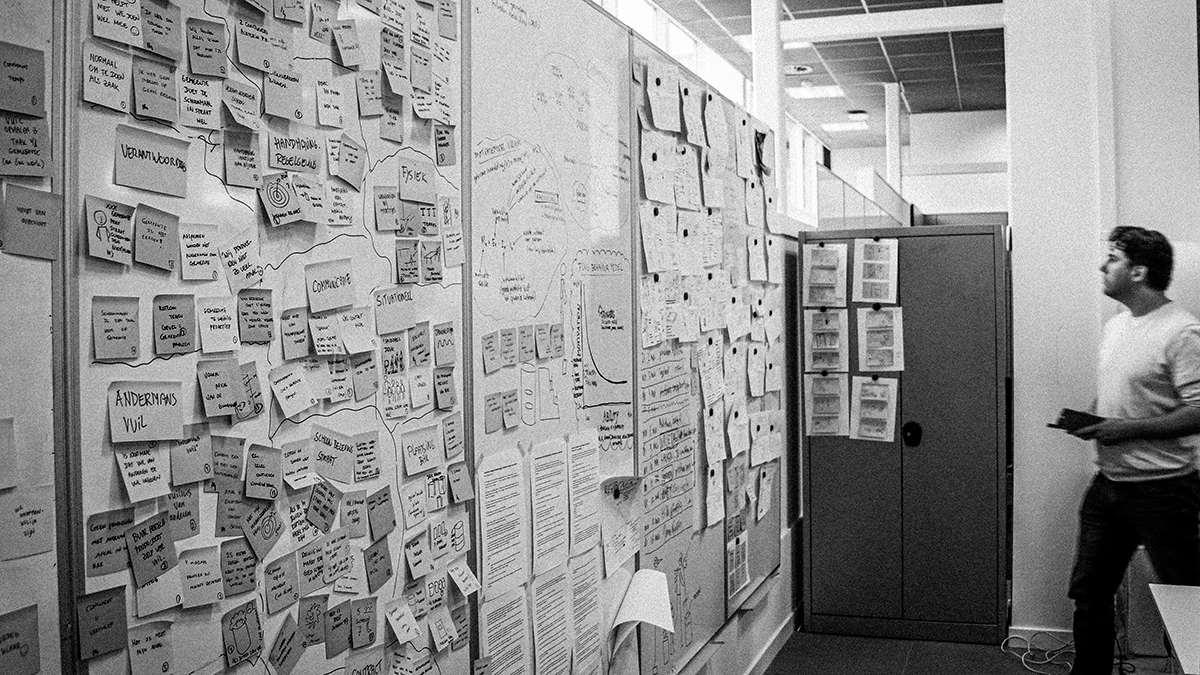
<div class="a-space-y-4">
    <!-- Basic Image -->
    <div>
        <h4 class="a-text-sm a-text-gray-600 a-mb-2">Basis afbeelding</h4>
        <div class="a-max-w-sm">
<img src="https://cdn.tiltshift.nl/assets/mensen/Johan-Groenen-Partner-Tiltshift.jpg" alt="Johan Groenen - Partner bij Tiltshift" loading="lazy">
        </div>
    </div>

    <!-- Image with custom classes -->
    <div>
        <h4 class="a-text-sm a-text-gray-600 a-mb-2">Afbeelding met custom styling</h4>
        <div class="a-flex a-gap-3">
<img src="https://cdn.tiltshift.nl/assets/img/Workshop-Crazy-Eight-Ideation-Warroom.jpg" alt="Workshop Crazy Eight" class="a-rounded-md a-w-48" loading="lazy">
<img src="https://cdn.tiltshift.nl/assets/img/Straatnotes-Straatcoaches-op-Straat-software-jeugdoverlast-terugdringen.jpg" alt="Straatnotes" class="a-rounded-lg a-shadow-md a-w-48" loading="lazy">
        </div>
    </div>

    <!-- Different loading strategies -->
    <div>
        <h4 class="a-text-sm a-text-gray-600 a-mb-2">Loading strategies</h4>
        <p class="a-text-xs a-text-gray-500 a-mb-2">Default is lazy loading, maar voor belangrijke afbeeldingen kun je eager loading gebruiken</p>
        <div class="a-max-w-xs">
<img src="https://cdn.tiltshift.nl/assets/img/Information-Radiator-War-Room-Wand-met-Stickies.jpg" alt="Information Radiator" class="a-rounded-md" loading="eager">
        </div>
    </div>
</div>
Image Container
Responsive afbeelding containers. Gebouwd met a-image-container.



<div class="a-flex a-gap-3 a-mb-3 a-flex-wrap a-justify-center">
    <div class="a-image-container a-h-160 a-rounded-md a-min-w-48">
        <img src="/assets/mensen/Johan-Groenen-Partner-Tiltshift.jpg" alt="Voorbeeld 1">
    </div>
    <div class="a-image-container a-h-160 a-rounded-lg a-shadow-md a-min-w-48">
        <img src="/assets/mensen/Joris-Boeren-Partner-Tiltshift.jpg" alt="Voorbeeld 2">
    </div>
    <div class="a-image-container a-h-160 a-rounded-sm a-min-w-48">
        <img src="/assets/img/Workshop-Crazy-Eight-Ideation-Warroom.jpg" alt="Voorbeeld 3">
    </div>
</div>
Separator
Visuele scheider atom voor breadcrumbs en lijsten. Types zijn slash, pipe, dot, arrow.
Verschillende types
In breadcrumb context
Verschillende groottes
Zonder spacing
<div class="a-space-y-4">
    <!-- Different Types -->
    <div>
        <h4 class="a-text-sm a-text-gray-600 a-mb-2">Verschillende types</h4>
        <div class="a-flex a-gap-2 a-items-center">
            <span class="a-text-sm">Item</span>
            <span class="a-text-1 a-text-grey a-mx-1">/</span>
            <span class="a-text-sm">Item</span>
            <span class="a-text-1 a-text-grey a-mx-1">|</span>
            <span class="a-text-sm">Item</span>
            <span class="a-text-1 a-text-grey a-mx-1">•</span>
            <span class="a-text-sm">Item</span>
            <span class="a-text-1 a-text-grey a-mx-1">→</span>
            <span class="a-text-sm">Item</span>
        </div>
    </div>

    <!-- In Breadcrumb Context -->
    <div>
        <h4 class="a-text-sm a-text-gray-600 a-mb-2">In breadcrumb context</h4>
        <nav class="a-flex a-items-center">
            <a href="#" class="a-text-sm a-text-primary-dark a-clickable">Home</a>
            <span class="a-text-0 a-text-grey a-mx-1">/</span>
            <a href="#" class="a-text-sm a-text-primary-dark a-clickable">Producten</a>
            <span class="a-text-0 a-text-grey a-mx-1">/</span>
            <span class="a-text-sm a-text-grey">Detail</span>
        </nav>
    </div>

    <!-- Different Sizes -->
    <div>
        <h4 class="a-text-sm a-text-gray-600 a-mb-2">Verschillende groottes</h4>
        <div class="a-flex a-gap-3 a-items-center">
            <span class="a-text-xs a-text-grey a-mx-1">/</span>
            <span class="a-text-sm a-text-grey a-mx-1">/</span>
            <span class="a-text-md a-text-grey a-mx-1">/</span>
            <span class="a-text-lg a-text-grey a-mx-1">/</span>
        </div>
    </div>

    <!-- Without Spacing -->
    <div>
        <h4 class="a-text-sm a-text-gray-600 a-mb-2">Zonder spacing</h4>
        <div class="a-flex a-items-center">
            <span class="a-text-sm">Compact</span>
            <span class="a-text-1 a-text-grey a-mx-1">/</span>
            <span class="a-text-sm">Layout</span>
        </div>
    </div>
</div>
Labels & Tags
Kleine informatieve labels/tags voor categorisering. Gebouwd met a-tag + kleur utilities.
<div class="a-flex a-gap-2 a-flex-wrap">
    <span class="a-tag a-text a-bg-off-white ts-label">Default</span>

    <span class="a-tag a-text a-bg-primary a-text-white ts-label ts-label--primary">Primary</span>

    <span class="a-tag a-text a-bg-black a-text-white ts-label ts-label--dark">Dark</span>

    <span class="a-tag a-text ts-label ts-label--secondary">Secondary</span>
</div>
Tag
Individuele tag atom met text en variant parameters.
<span class="a-tag a-text a-bg-primary a-text-white ts-label ts-label--primary">Example Tag</span>Color Swatch
Kleur weergave atom met automatische tekst contrast. Toont kleurnaam, hex code en beschrijving.
#E64544
#1E59A6
#1D1621
#FFFFFF
<div class="a-grid-auto a-gap-3">
    <div class="a-color-swatch a-rounded-md a-overflow-hidden a-min-h-24 "
     style="background-color: #E64544; color: #FFFFFF;">
    <div class="a-p-4">
        <div class="a-font-bold a-mb-1" style="color: #FFFFFF;">
            Primary Red
        </div>
        <code class="a-font-mono a-text-sm a-font-bold" style="color: #FFFFFF; background: none;">#E64544</code>

            <div class="a-text-sm a-mt-2" style="color: #FFFFFF; opacity: 0.85;">
                Energie & Actie
            </div>

    </div>
</div>

    <div class="a-color-swatch a-rounded-md a-overflow-hidden a-min-h-24 "
     style="background-color: #1E59A6; color: #FFFFFF;">
    <div class="a-p-4">
        <div class="a-font-bold a-mb-1" style="color: #FFFFFF;">
            Primary Blue
        </div>
        <code class="a-font-mono a-text-sm a-font-bold" style="color: #FFFFFF; background: none;">#1E59A6</code>

            <div class="a-text-sm a-mt-2" style="color: #FFFFFF; opacity: 0.85;">
                Vertrouwen & Stabiliteit
            </div>

    </div>
</div>

    <div class="a-color-swatch a-rounded-md a-overflow-hidden a-min-h-24 "
     style="background-color: #1D1621; color: #FFFFFF;">
    <div class="a-p-4">
        <div class="a-font-bold a-mb-1" style="color: #FFFFFF;">
            Black
        </div>
        <code class="a-font-mono a-text-sm a-font-bold" style="color: #FFFFFF; background: none;">#1D1621</code>

            <div class="a-text-sm a-mt-2" style="color: #FFFFFF; opacity: 0.85;">
                Kracht & Professionaliteit
            </div>

    </div>
</div>

    <div class="a-color-swatch a-rounded-md a-overflow-hidden a-min-h-24 a-border"
     style="background-color: #FFFFFF; color: #1D1621;">
    <div class="a-p-4">
        <div class="a-font-bold a-mb-1" style="color: #1D1621;">
            White
        </div>
        <code class="a-font-mono a-text-sm a-font-bold" style="color: #1D1621; background: none;">#FFFFFF</code>

            <div class="a-text-sm a-mt-2" style="color: #1D1621; opacity: 0.85;">
                Helderheid & Eenvoud
            </div>

    </div>
</div>
</div>
Social Link
Individuele social link atom met platform en url parameters.
Atomic Utility Classes
Naast componenten bieden we ook utility classes voor snelle styling. Alle volgen het ABEM pattern met a- prefix.
Layout
a-block,a-inline-blocka-flex,a-inline-flexa-grid,a-grid-autoa-relative,a-absolute,a-fixed
Spacing
a-p-{0-5}- paddinga-m-{0-5}- margina-gap-{1-5}- gap
Typography
a-text-{xs,sm,md,lg,xl,2xl}a-font-{normal,semibold,bold}a-text-{color}
Colors & Effects
a-bg-{color}a-bordera-rounded-{sm,md,lg}a-shadow-{sm,md,lg}
Social Links
Social media links met iconen. Flexibele grootte en kleuren.